Making Appointments with a Scheduling Ticket
Follow the instructions below to access the scheduling ticket and schedule your appointment. Haga clic aquí para español.
1. Log into your Callen-Lorde MyChart account. Schedule appointments by clicking on the “Visits” activity at the top of the screen OR from the ticket reminder as highlighted.
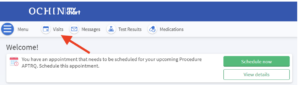
From the “Visits” page, click on “Schedule an Appointment.” If Scheduling from the homepage, Click “Schedule Now”.

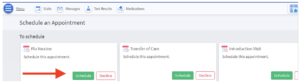
3. Any scheduling tickets you have will appear at the top of the screen under “To schedule”. Click on “Schedule”
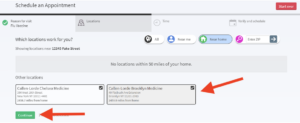
4. Select which locations are convenient for you and click “Continue”
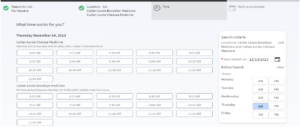
5. Select the appointment time you wish to book. Please note the location and provider if applicable.
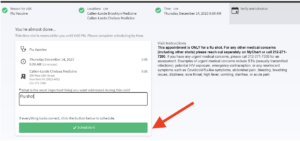
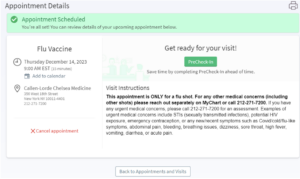
6. Confirm the details of your appointment, visit instructions, and add any details if needed. Click “Schedule it” to schedule and confirm your appointment.
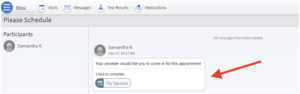
If scheduling from a MyChart Message, the ticket to schedule will be within the message that has been sent to you. Click the appointment bubble as highlighted and follow the same previous steps to schedule.
If you have any questions, please feel free to message us on MyChart, or call us at (212) 271-7200.
Concertar citas con un ticket de programación
Siga las instrucciones a continuación para acceder al ticket de programación y programar su cita.
- Inicie sesión en su cuenta de MyChart de Callen-Lorde. Programe citas haciendo clic en la actividad “Visitas” en la parte superior de la pantalla O desde el recordatorio de boletos como se resalta.

- En la página “Visitas”, haga clic en “Programar una cita”. Si programa desde la página de inicio, haga clic en “Programar ahora”.

- Cualquier ticket de programación que tenga aparecerá en la parte superior de la pantalla en “Programar”. Haga clic en “Programar”

- Seleccione las ubicaciones que más le convengan y haga clic en “Continuar

- Seleccione la hora de la cita que desea reservar. Tenga en cuenta la ubicación y el proveedor, si corresponde.

- Confirme los detalles de su cita, las instrucciones de la visita y agregue cualquier detalle si es necesario. Haga clic en “Programar” para programar y confirmar su cita.


Si programa desde un mensaje de MyChart, el ticket para programar estará dentro del mensaje que se le ha enviado. Haga clic en la burbuja de la cita como se resalta y siga los mismos pasos anteriores para programar.

Si tiene alguna pregunta, no dude en enviarnos un mensaje en MyChart o llámenos al (212) 271-7200.